A consulting dashboard from your timesheet or billing export.
Export your time entries as CSV or Excel. Daized reads billable hours, rates, clients and projects, and builds the dashboard around them.
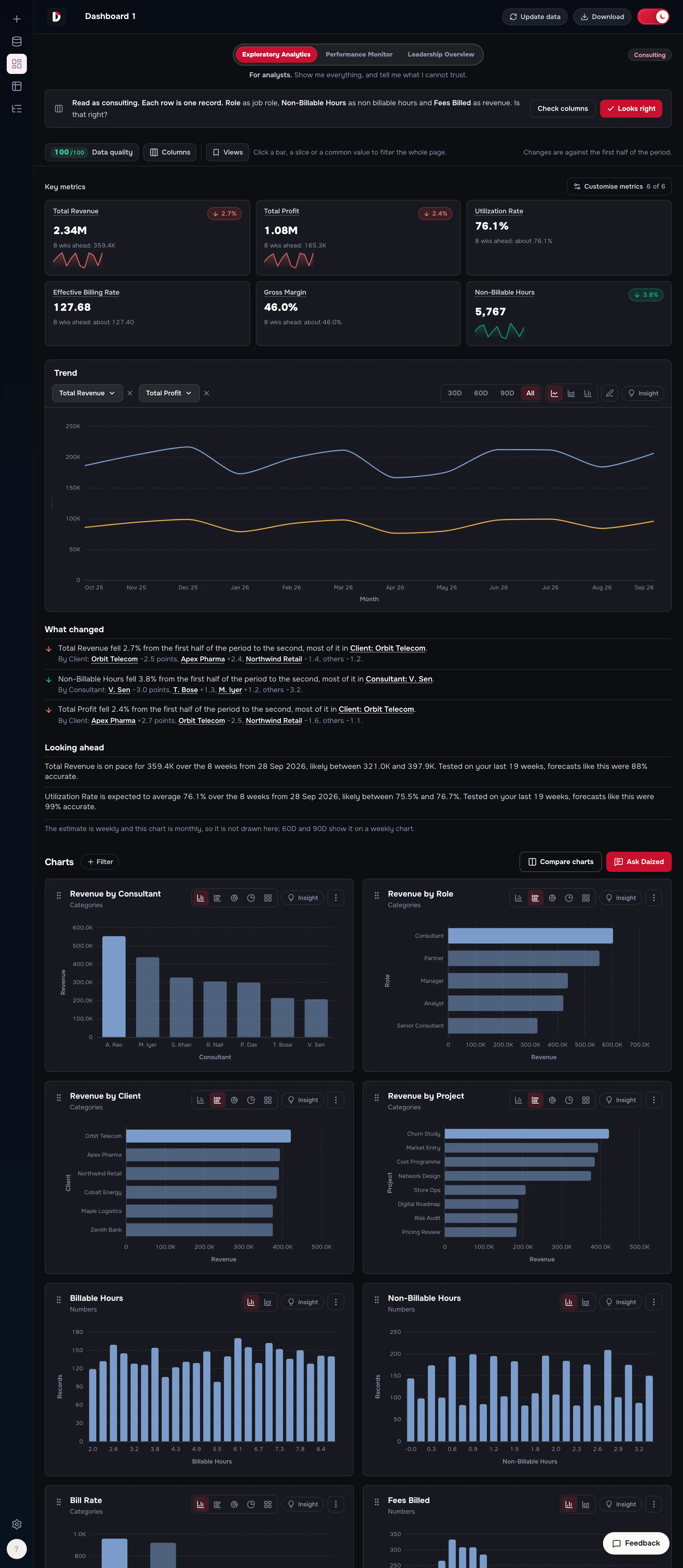
What Daized builds from a consulting file
From the sample file, these were the key metrics it put first.
- Total Revenue
- Total Profit
- Utilization Rate
- Effective Billing Rate
- Gross Margin
- Non-Billable Hours
Below them: a trend you can switch between lines and bars, a written “What changed” that names the biggest driver, and “Looking ahead”, which appears only when the forecast passes a test on your own history and shows its score. Every other column worth charting gets a chart of its own, and clicking a bar filters the whole page.
“Total Revenue fell 2.7% from the first half of the period to the second, most of it in Client: Orbit Telecom.”
How it reads your file
It tells you how it read each column before you rely on the dashboard, and you can correct it.
On the sample file it wrote: “Read as consulting. Each row is one record. Role as job role, Non-Billable Hours as non billable hours and Fees Billed as revenue. Is that right?”
- Datea date, so every metric can be followed over time
- Consultant, Role, Client, Projectways to split the numbers and find where a change came from
- Billable Hours, Non-Billable Hoursused for utilization, and for the hours that were not charged
- Bill Rateread as the hourly rate charged
- Fees Billed, Costread as revenue and cost, used for fees, profit and margin
Questions
- What does my file need to look like?
- A CSV or Excel file with a header row and one row per time entry, up to 100 MB. Column names do not have to match the ones above: Daized reads the values as well as the names, and tells you how it read each one.
- Do I have to set anything up?
- No. There is no data model to build, no formulas to write and nothing to prompt. You upload the file and the dashboard is built from it.
- Are the numbers calculated, or written by an AI?
- Calculated, in code, from your file. A written explanation only describes numbers the code already produced, and each one is labelled as written or computed.
- How long is my file kept?
- The table from your upload is kept for 30 days after you last open it, and you can delete a dataset yourself at any time. Read exactly what is stored.
- What does it cost?
- It is free to try. See the plans.